


|
Name |
Panda Gamepad Pro |
|---|---|
|
Google Play Link |
GET IT ON
Google Play
|
|
Category |
Tools |
|
Developer |
Panda Gaming Studio |
| Last version | 15 |
|
Updated |
|
|
Compatible with |
Android 4.4+ |
Introduction to Panda Gamepad Pro MOD APK
Panda Gamepad Pro is a controller mapping app for Android. It helps you play mobile games and use selected apps with a gamepad, keyboard, or mouse instead of relying only on touchscreen controls. Its main job is simple: turn touch-based actions into button-based commands that feel faster and more comfortable.
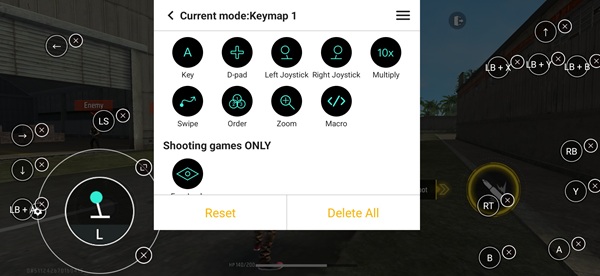
The app is mainly used to create custom keymaps for different games. You can assign movement, aiming, tapping, and other actions to physical buttons based on your setup. That makes it useful for players who prefer the feel of a controller or want a layout that matches their habits better. For people who dislike cramped on-screen controls, this can feel like a small rescue mission for their thumbs.
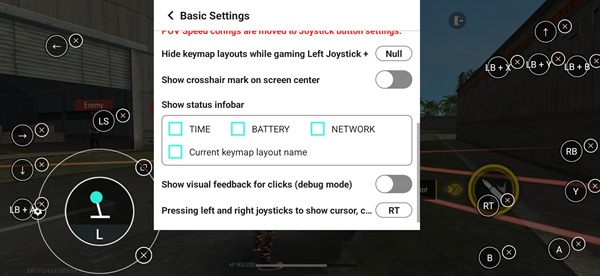
One practical strength is its support for multiple input devices. Panda Gamepad Pro is designed to work with many external controllers and can also support keyboard and mouse input on compatible devices. It also saves your setup, so after the first configuration, launching a game again is much easier. That cuts down the time spent tweaking controls every session.
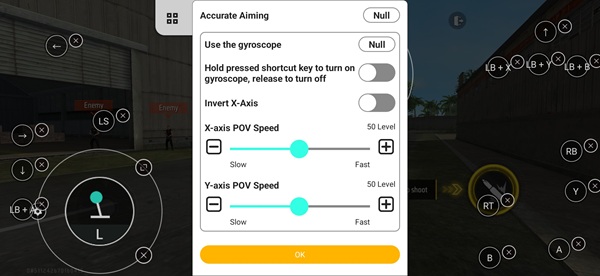
The app also includes features like calibration and setup testing. These tools help users check if button mapping responds correctly before jumping into a match. Some versions and sources also mention Google Play integration and functions aimed at reducing detection risks while using mapped controls. That sounds useful, but it is still smart for users to be careful, since support and behavior can vary by game, Android version, and device model.
Its biggest advantage is convenience. It gives players more control over how they interact with mobile games, especially in titles that feel awkward on touchscreens. It can also help users who want a more console-like setup on mobile. Still, there are limits. Initial setup may take a bit of patience, some games may need manual adjustment, and compatibility is not guaranteed in every title. If a game changes its control system after an update, your mapping may need a fresh round of edits.
Panda Gamepad Pro is a good fit for mobile gamers who already own a controller and want more flexible controls on Android. It is most useful in action, shooting, racing, and open-world games where touch input can feel messy. Casual users can still use it, though they may need a few minutes to understand the setup. If you like pressing real buttons instead of tapping virtual ones, this app makes a lot of sense.
FAQs Panda Gamepad Pro
What is Panda Gamepad Pro used for?
+
Panda Gamepad Pro is used to map touchscreen controls to a gamepad, keyboard, or mouse so you can play Android games with physical input devices.
How does Panda Gamepad Pro work?
+
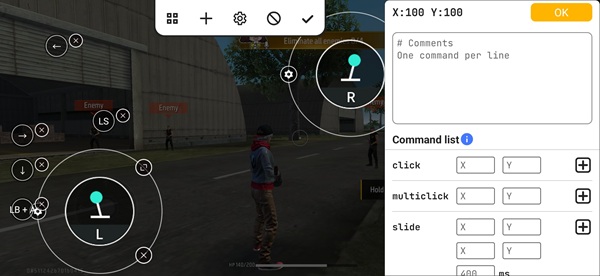
It lets you create custom button layouts for supported games and apps. You place virtual control points on the screen, then assign them to buttons on your controller or keys.
Does Panda Gamepad Pro support different controllers?
+
Yes. It is built to work with many external input devices, including gamepads, and in some cases keyboard and mouse setups on compatible Android devices.
Are there any downsides to Panda Gamepad Pro?
+
Yes. Setup can take time, some games may need manual adjustments, and compatibility can change depending on the game, device, or Android version.
Who should use Panda Gamepad Pro?
+
It is best for Android users who want more comfortable controls in mobile games, especially people who prefer a controller over touchscreen input.
Discover More Interesting Apps
-
 Mod
Mod
DiskWala
v26.8
123.89 Mb
Updated -
Neon App
v2.14.1
117.01 Mb
Updated -
HaloVPN
v20.1.3
93.33 Mb
Updated -
Panda Mouse Pro
v15
25.00 Mb
Updated -
Mod
Terabox
v4.27.5
252.70 Mb
Updated -
GearUP Game Booster
v4.0.9
19.38 Mb
Updated -
NIL Club
v5.1.12
167.85 Mb
Updated -
TikFinity
v2.7.4
91.39 Mb
Updated -
Mod
PigeonCast
v3.7.0
64.62 Mb
Updated -
Fing
v12.13.5
48.47 Mb
Updated









Share Your Thoughts